
Target query: low voltage closeout documentation checklist
Low Voltage Closeout Documentation Checklist
Closeout documentation is where many low voltage projects quietly lose time, cash flow, and customer confidence. This guide gives commercial low voltage contractors a practical checklist for collecting the field notes, photos, as-builts, test results, approvals, and billing signals needed to close jobs cleanly.
Why closeout documentation matters for low voltage contractors
Low voltage work is document-heavy by nature. A structured cabling job might need test results, labels, floor plans, rack elevations, and outlet counts. An access control project might need device schedules, door hardware notes, credential handoff, programming details, and owner training records. A security camera project might need camera locations, screenshots, user permissions, warranty information, network details, and final customer acceptance.
When these details live in text messages, personal camera rolls, email threads, spreadsheets, whiteboards, and folders with inconsistent names, the job may be physically complete but operationally unfinished. That gap is where billing slows down. It is also where customer questions turn into internal fire drills because nobody can quickly prove what was installed, changed, tested, approved, or left open.
A good closeout process is not just an administrative cleanup step. It is a job control system. It helps project managers identify risk before the last day on site, helps field teams capture proof while the work is still visible, helps accounting know when to invoice, and helps owners understand whether revenue is stuck because of missing paperwork, unresolved punch items, or scope that was never converted into a change order.
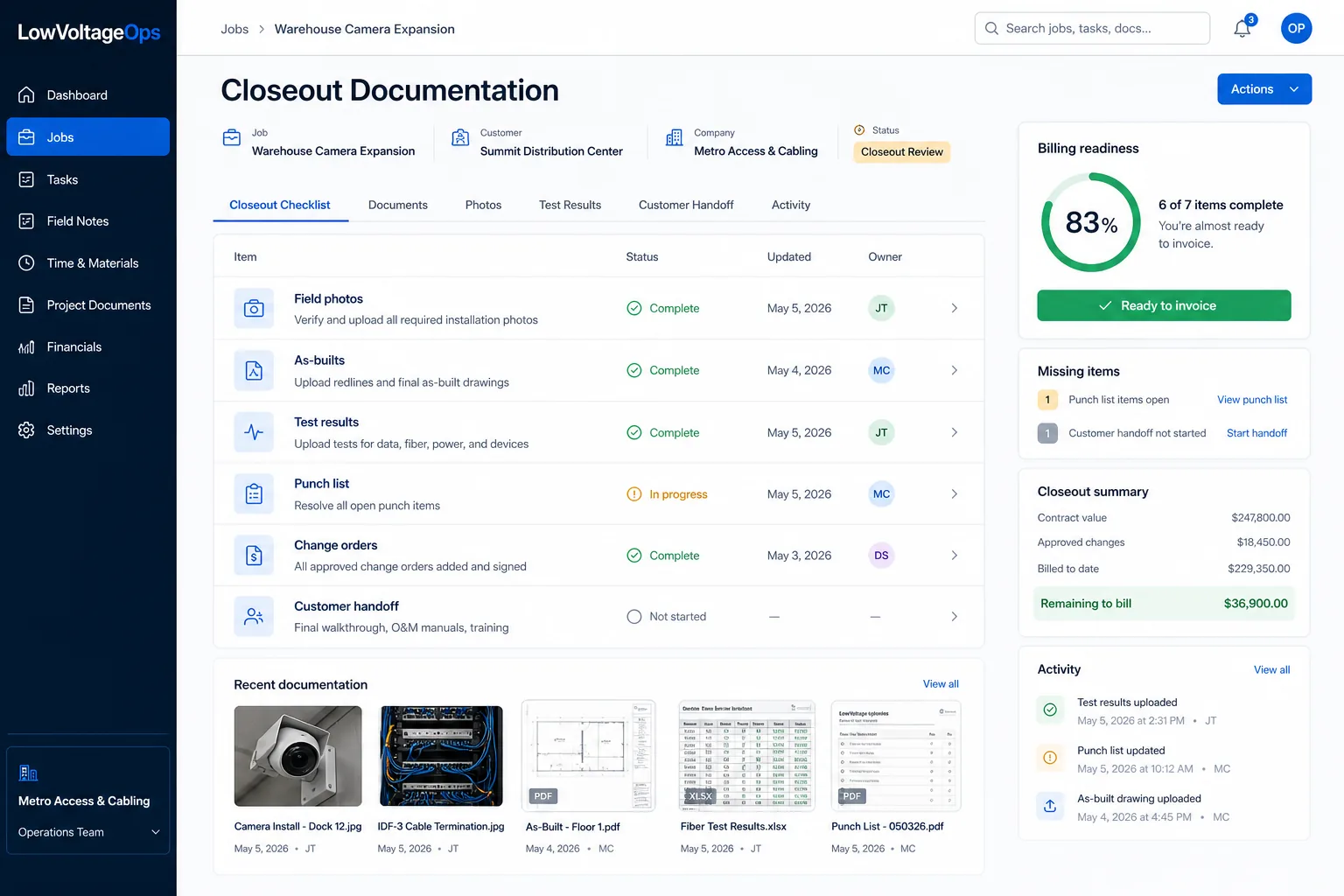
The low voltage closeout documentation checklist
Use this checklist as a baseline for commercial low voltage, structured cabling, security, access control, camera, and AV projects. Not every job needs every item, but every company should decide which items are required by project type so the field and office are not guessing at the end.
1. Contract, scope, and approved changes
- Original proposal, estimate, or signed contract attached to the job record.
- Approved scope of work with exclusions clearly visible.
- All approved change orders with date, amount, customer approval, and status.
- Rejected or pending change requests documented so they do not become billing disputes.
- Allowance, alternate, and unit-price items reconciled against actual installation.
This section protects margin. If a technician adds devices, moves cable paths, works after hours, changes mounting locations, or returns because another trade blocked access, that activity needs to become either approved scope, a documented no-charge decision, or a clear internal cost. Untracked changes are one of the fastest ways a profitable job becomes a vague memory.
2. Field notes and daily job history
- Daily or milestone field notes from the technician, lead, or foreman.
- Notes tied to the right job, building, floor, room, system, or phase.
- Blocked-work notes that explain why work could not proceed.
- Material shortage notes and return-trip reasons.
- Customer or GC conversations that affect scope, timing, or acceptance.
Field notes are not just a diary. They are the evidence trail for schedule delays, labor overruns, customer approvals, change order justification, and billing readiness. The best notes are short, specific, and attached directly to the job. A note that says "waiting on door hardware at north entry" is more useful than "site not ready." A note that says "installed six additional drops requested by tenant rep, change order needed" is more useful than "extra work done."
3. Photos and visual proof
- Before photos for areas where existing conditions matter.
- Progress photos for rough-in, pathways, racks, panels, device locations, and above-ceiling work.
- Final photos for installed devices, labels, rack dressing, head-end equipment, and cleaned work areas.
- Photos tagged by job, location, date, and system type.
- Photos of hidden conditions before walls, ceilings, or equipment covers are closed.
Photos become much less useful when they are dumped into a shared folder without context. A closeout-ready photo should answer: what job is this, what location is shown, why does the photo matter, and what action does it support? That is especially important for cable pathways, access control doors, camera views, IDF/MDF work, and any installation detail that could become expensive to re-verify later.

4. Drawings, as-builts, and marked-up plans
- Latest approved drawings or floor plans attached to the project.
- Marked-up as-builts showing final device locations, cable routes, rack locations, and major deviations.
- Version history so the team knows which drawing is current.
- Clear naming conventions for building, floor, area, and revision date.
- Customer-facing final plan package separated from internal working notes when needed.
Low voltage teams often make reasonable field adjustments because the site changes, another trade blocks a path, the customer moves a device, or the original drawing misses a condition. The problem is not the adjustment. The problem is failing to capture the final installed reality. As-builts keep future service work from starting from scratch and help customers trust the closeout package.
5. Testing, commissioning, and verification records
- Cable certification or test results for structured cabling and fiber work.
- Camera view verification, recording confirmation, and user access validation.
- Access control door testing, request-to-exit checks, lock behavior, and credential tests.
- Alarm, intercom, AV, paging, or network commissioning notes where applicable.
- Failed tests, retests, and corrective actions documented in the job record.
Testing records should not be treated as a separate technical archive that the PM and accounting team cannot see. If the job cannot be invoiced until tests pass, then test status is a billing signal. If the customer will not accept the job until camera views are verified, then those screenshots or notes are closeout evidence. If a cable failed and was corrected, the corrected result should be attached where future service teams can find it.
6. Punch list and open item status
- Internal punch list separated from customer punch list.
- Each item assigned to an owner with due date and status.
- Photos or notes showing completion where possible.
- Items blocked by customer, GC, other trades, or material availability flagged clearly.
- Final review showing what is complete, what is pending, and what is excluded from current billing.
A punch list is useful only when it is current. A stale punch list creates false confidence for the office and frustration for the field. For larger projects, review punch status weekly before the end of the job. Waiting until the final walkthrough to discover missing labels, untested drops, incomplete owner training, or unavailable material creates avoidable billing lag.
7. Customer acceptance, training, and handoff
- Customer sign-off or written acceptance where required.
- Training date, attendees, and topics covered.
- Admin credentials, user roles, or access handoff process documented securely.
- Warranty, support, and service escalation details provided.
- Customer-facing closeout package delivered and recorded.
For many low voltage contractors, the final handoff is where customer satisfaction is either reinforced or weakened. A customer may love the installation but still feel unsupported if they do not know who has admin access, where the documentation lives, how to request support, or what was included in the final scope. The closeout package should reduce future confusion.
8. Billing readiness package
- Invoice amount reconciled against contract, approved changes, deposits, and progress billings.
- Required backup documents attached before accounting asks for them.
- Retainage, partial billing, or milestone billing rules noted.
- Open exceptions listed with who owns the next action.
- Final job cost and margin review ready for leadership.
Billing readiness is the bridge between project completion and cash collection. A low voltage job should not sit in limbo because accounting is chasing the PM, the PM is chasing the field, and the field is trying to remember what happened two weeks ago. The closeout process should make invoice readiness visible before the job is considered done.
A practical closeout workflow from kickoff to invoice
The biggest mistake is treating closeout as an end-of-job event. Strong contractors build closeout into the job from the beginning. That does not mean adding bureaucracy. It means deciding what evidence the company will eventually need and collecting it while the work is happening.
| Project stage | Closeout action | Owner | Why it matters |
|---|---|---|---|
| Kickoff | Define required closeout items by job type. | PM or operations | The field knows what proof, photos, and tests are expected. |
| Scheduling | Attach scope, drawings, site notes, and contact information to the job. | PM | Technicians start with the same information the office has. |
| Field work | Capture notes, photos, blockers, and change requests by milestone. | Field lead | Closeout evidence is collected before details are forgotten. |
| Weekly review | Review missing documents, pending change orders, and punch items. | PM | Problems are fixed before they delay billing. |
| Substantial completion | Confirm tests, as-builts, customer training, and open exceptions. | PM and field lead | The team knows whether the project is actually ready to close. |
| Invoice review | Package billing support and final margin data. | Accounting and PM | Invoices go out with less rework and fewer disputes. |
This workflow also improves accountability. Instead of asking "who has the photos?" or "did we ever get that signed?", the team can see which closeout items are complete, which are missing, and which are blocked. That changes closeout from a scavenger hunt into a managed process.
What closeout should look like in low voltage software
Software does not fix a weak process by itself, but the right system makes the process easier to follow. For low voltage contractors, closeout belongs inside the same operating workflow as scheduling, job management, field updates, documents, and reporting. If closeout lives in a separate spreadsheet, a PM's inbox, or a folder nobody checks until invoice time, the team will keep losing time.
Job dashboard screen
A job dashboard should show the project status, next scheduled work, open punch items, missing closeout documents, pending change orders, and billing readiness. Owners should be able to scan this view and understand which jobs are done in the field but still stuck administratively.
Field notes and photo screen
Field technicians should be able to add notes and photos without navigating a complex office system. The field view should make it easy to capture what was completed, what blocked the work, what changed, and what proof was collected. A good mobile workflow increases documentation because it respects how technicians actually work on site.
Documents and closeout checklist screen
The PM should have a checklist by job type. A structured cabling checklist might require test results, labels, as-builts, rack photos, and customer acceptance. An access control checklist might require door schedule, credential handoff, programming notes, training, and final testing. A camera project might require camera list, view verification, recorder settings, user handoff, and warranty information.
Reporting and billing readiness screen
Leadership should see how much revenue is waiting on closeout, how many jobs are missing documentation, which PMs need support, and whether billing delays are coming from field documentation, customer approval, change orders, punch work, or accounting review. That is where closeout becomes an operating metric instead of a file folder.

How closeout documentation improves billing readiness and job profitability
For low voltage contractors, delayed billing is rarely caused by one dramatic failure. It is usually a collection of small missing items: one unsigned change order, one unclear punch item, one missing test file, one customer training note that never made it back to the office, one set of final photos still sitting on a technician's phone. Each item feels small, but together they slow cash flow and create pressure across the business.
A strong closeout workflow improves billing readiness in four ways. First, it creates proof of completion. Second, it makes exceptions visible early. Third, it helps the PM protect approved revenue by tracking changes. Fourth, it gives accounting the backup needed to invoice confidently. The result is not just cleaner paperwork. It is better cash flow and more reliable margin reporting.
Closeout data also improves future estimating. If the team can see which project types consistently require extra return trips, which customers create approval delays, which systems generate punch work, and where documentation is usually missing, leadership can adjust pricing, staffing, scheduling, and contract language. That is how operational discipline becomes profitability.
Common closeout mistakes to avoid
Waiting until the job is over
By the time a project is finished, ceilings may be closed, racks may be locked, the field team may be on another site, and small details may be forgotten. Capture closeout evidence during the work, not after the scramble starts.
Using photos without labels or context
A folder full of photos is not a closeout package. Photos should connect to the job, location, date, system, and reason. If nobody can tell what the image proves, it will not help the PM, customer, or service team later.
Separating closeout from billing
If closeout status does not affect billing readiness, missing documentation can sit unnoticed. The PM, accounting team, and owner should all be able to see why a job is or is not ready to invoice.
Letting change orders live in email
Email is fine for communication, but it is a poor system of record. Change orders should be tied to the job with approval status, amount, dates, and billing impact. Otherwise the company risks doing work it cannot confidently bill.
Internal roles: what each team needs to see
Closeout works best when each role has the right view of the same job record.
- Owners need to see revenue stuck in closeout, jobs ready to bill, margin risk, overdue punch items, and PM workload.
- Project managers need missing-document alerts, change order status, punch list ownership, customer acceptance status, and field note history.
- Field leads need a simple mobile way to see required closeout items and submit photos, notes, tests, and completion updates.
- Accounting needs invoice amount, billing terms, approved changes, backup documents, retainage notes, and exceptions.
- Service teams need final installed details, device locations, customer notes, warranty information, and prior issue history.
When every role works from a different file, closeout depends on memory. When every role works from the same job record, closeout becomes repeatable.
Recommended weekly closeout review
A weekly closeout review does not need to be long. For many contractors, 20 to 30 minutes is enough if the right information is already organized. Review active jobs, jobs near completion, jobs waiting on customer action, and jobs ready for invoice. The meeting should answer five questions:
- Which jobs are physically complete but not ready to bill?
- What documentation is missing and who owns it?
- Which change orders are pending approval or billing?
- Which punch items are blocking customer acceptance?
- Which jobs need owner attention because cash flow or margin is at risk?
This meeting creates a habit of finding billing blockers before they become old news. It also gives leadership a clearer picture of whether the company has a sales problem, a production problem, a documentation problem, or a billing process problem.
How LowVoltageOps supports closeout documentation
LowVoltageOps is built around the idea that commercial low voltage contractors need one operating workflow for jobs, scheduling, field updates, documents, proposals, billing readiness, margins, and reporting. Closeout documentation should not be a disconnected folder at the end of a project. It should be part of the job record from the first scheduled visit through final invoice review.
Teams evaluating low voltage contractor software should look for workflows that connect closeout with field service updates, scheduling, reporting, and profitability visibility. The closer those workflows are, the easier it becomes to answer the question every owner eventually asks: which jobs are ready to bill, which jobs are stuck, and why?
Frequently asked questions
What is low voltage closeout documentation?
Low voltage closeout documentation is the final record of what was installed, tested, changed, approved, and handed off to the customer. It often includes field notes, photos, test results, as-builts, device schedules, training notes, warranty details, change orders, punch list status, and billing backup.
When should a low voltage contractor start collecting closeout documentation?
Closeout documentation should start at kickoff. The PM should define required closeout items before field work begins, and technicians should collect notes, photos, test results, and exceptions throughout the job. Waiting until the end increases rework and slows billing.
What is the difference between closeout documentation and a punch list?
A punch list tracks remaining work or corrections. Closeout documentation is broader. It includes the punch list, but also includes proof of completion, final drawings, test results, change orders, training, customer acceptance, billing support, and records needed for future service.
How does closeout documentation help with job profitability?
Closeout documentation helps profitability by protecting change order revenue, reducing return trips, improving billing speed, making labor overruns easier to explain, and giving leadership better data about which project types create margin risk.