
Target query: low voltage job management dashboard
Low Voltage Job Health Dashboard: What Owners Should Track
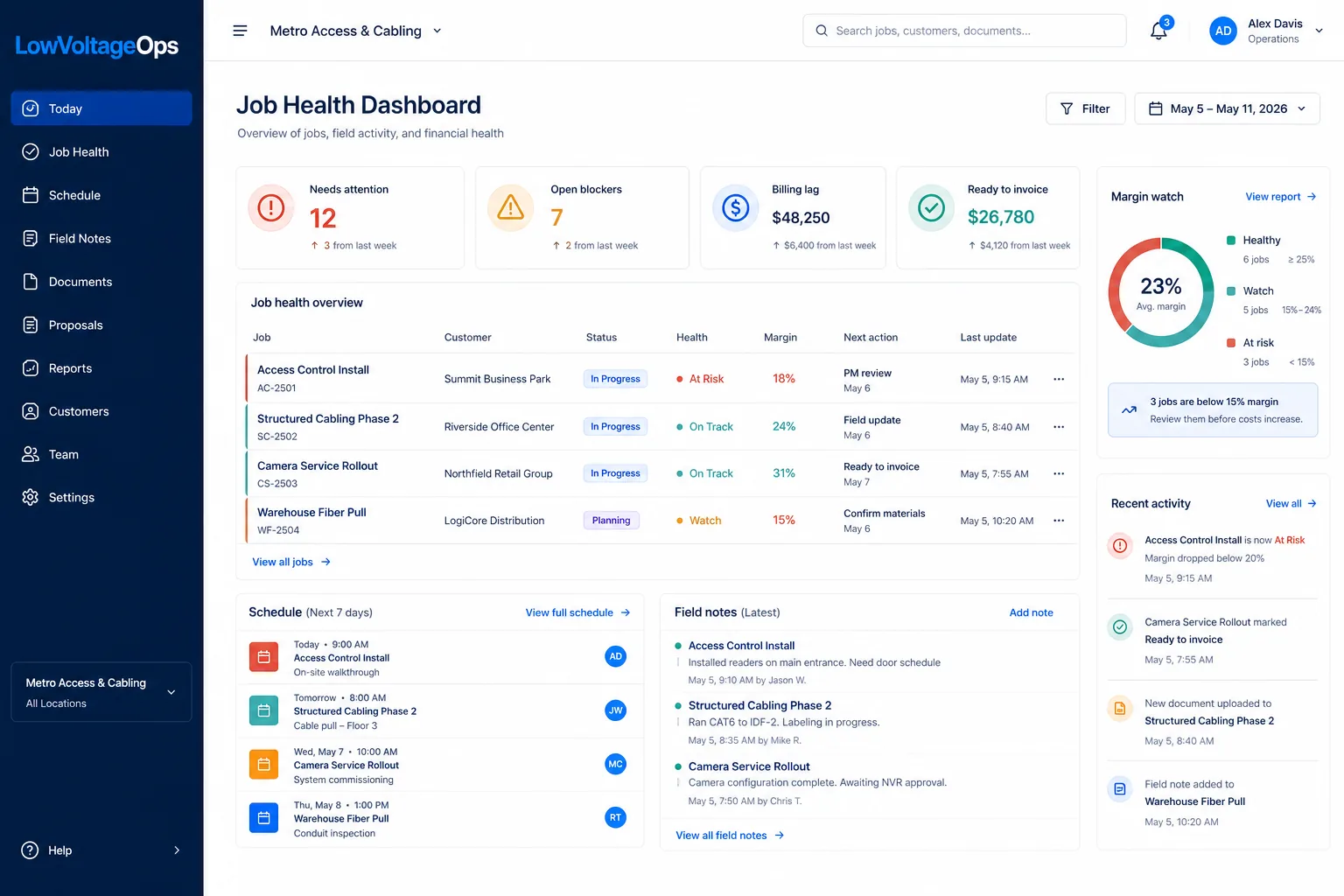
A low voltage job health dashboard should help an owner answer a simple question: which jobs are healthy, which jobs are drifting, which jobs are ready to bill, and which jobs are quietly eating margin? This guide breaks down the operating metrics commercial low voltage contractors should track across jobs, field teams, schedules, closeout, billing, and profitability.
Why job health matters for low voltage contractors
Low voltage jobs rarely fail all at once. They usually drift through a series of small misses: the field team is waiting on access, one change order was never approved, a PM does not know a crew needs materials, a customer has not signed off on a device location, test results are missing, or accounting cannot invoice because closeout documents are incomplete. Each issue may look manageable in isolation. Together, they create delayed billing, labor overruns, customer frustration, and margin compression.
A job health dashboard gives owners, PMs, field leaders, and accounting a shared way to see that drift before month end. Instead of asking for updates in meetings, hunting through text messages, or building a spreadsheet from memory, leadership can review the current operating picture: job status, schedule, field notes, blockers, documents, billing readiness, and profitability signals.
The dashboard does not need to be complicated. In fact, the best dashboards are usually direct. They show what matters, who owns the next action, and where attention is needed. For low voltage contractors, the dashboard should be built around the way work actually moves: estimate, proposal, job setup, schedule, field work, closeout, invoice, and reporting.
Core metrics every low voltage job health dashboard should track
A dashboard should not be a wall of numbers. It should separate signal from noise. These are the metrics that give low voltage owners a realistic operating view.
1. Active jobs by status
Start with a clear count of active jobs by status: lead, scheduled, rough-in, trim, testing, punch, closeout, invoiced, on hold, and completed. Generic statuses like "active" or "in progress" are often too vague. A structured cabling project in testing is very different from an access control job waiting on door hardware or a camera project waiting on customer view approval.
Owners should be able to see how many jobs are in each stage and whether too much work is piling up in one part of the process. If many jobs are stuck in closeout, the company may have a documentation problem. If too many jobs are on hold, the issue may be scheduling, materials, customer readiness, or PM capacity.
2. Next action and owner
Every job should have a next action and a named owner. A dashboard that shows status without next action creates false visibility. "Testing" is not enough. "Upload fiber test results by Friday" is actionable. "Waiting on customer approval for camera relocation" is actionable. "PM to submit change order for added door controller" is actionable.
This is one of the simplest ways to improve accountability. The dashboard should make it easy to answer: who owns the next step, what are they doing, and when should it happen?
3. Field notes and last field update
Owners do not need every field detail on the main dashboard, but they do need to know whether field updates are current. A job with no recent field note may be a visibility risk even if the schedule looks fine. The dashboard should show the last update date, who submitted it, and whether the note included a blocker, completion signal, or follow-up request.
For low voltage teams, field notes often explain why the financials moved. A labor overrun may make sense if the GC blocked access for two days, the customer added devices, or another trade changed the pathway. Without field context, the numbers are harder to interpret.
4. Schedule movement and missed dates
Low voltage jobs depend on access, materials, other trades, customer approvals, and crew availability. A dashboard should show upcoming scheduled work, missed scheduled work, unscheduled active jobs, and jobs that have moved multiple times. Repeated schedule movement is often an early warning sign that a job needs PM attention.
Good schedule visibility also helps prevent overcommitting crews. If the owner can see upcoming installs, service commitments, and closeout work in the same system, they can spot workload pressure before it turns into rushed work or missed handoffs.
5. Blockers and aging blockers
A blocker is anything that prevents the job from moving forward: no site access, missing material, unanswered RFI, unsigned change order, customer decision pending, failed test, other trade incomplete, or internal resource conflict. The dashboard should show open blockers and how long they have been open.
Aging matters. A blocker opened yesterday may be normal. A blocker open for 18 days may be a leadership issue. Owners should be able to quickly identify blockers that need escalation.
6. Change order exposure
Unapproved change orders are one of the clearest margin risks in low voltage work. A dashboard should show pending change order amount, submitted date, approval status, and whether work has already been performed. If the team has completed extra work but the change order is not approved, the dashboard should make that visible.
This protects both revenue and decision-making. Sometimes the right decision is to perform extra work for customer goodwill. But that should be a deliberate choice, not a hidden cost discovered after closeout.
7. Closeout documentation status
For structured cabling, security, access control, AV, and network projects, closeout documentation is a major billing readiness signal. A dashboard should track required photos, as-builts, test results, device schedules, customer training, punch list, warranty information, and final acceptance. The goal is to know what is missing before the invoice is delayed.
This is especially important when the job is physically complete but administratively stuck. A dashboard should separate "done in field" from "ready to bill." Those are not always the same thing.
8. Billing readiness and unbilled completed work
Billing readiness should be a first-class dashboard metric. Owners should know which jobs are ready to invoice, which jobs are waiting on PM review, which jobs are waiting on customer approval, and which jobs are missing documentation. They should also know the dollar value of completed or partially completed work that has not been billed.
Unbilled completed work is a cash flow problem. If a contractor has healthy sales and busy crews but slow invoicing, the dashboard should expose where billing is getting stuck.
9. Labor variance and margin watch
A low voltage job health dashboard should connect operational status to financial risk. Track estimated labor, actual labor, remaining forecast, material cost, subcontractor cost, approved change orders, pending change orders, invoiced amount, and projected margin. The owner does not need a full accounting report in the dashboard, but they do need early warning when a job is moving in the wrong direction.
The most useful margin view is not just "actual versus budget." It is "actual plus remaining work versus budget, with known risks and change orders included." That gives PMs and owners time to act before the job closes.
10. Customer acceptance and dispute risk
Some jobs are delayed not because the work is incomplete, but because customer acceptance is unclear. The dashboard should track whether the customer has approved camera views, access control programming, final device placement, training, punch completion, and closeout package delivery. It should also surface open customer concerns that could delay payment.
Recommended dashboard layout
A practical job health dashboard can be organized into four sections:
| Dashboard section | What it shows | Why it matters |
|---|---|---|
| Owner summary | Active jobs, ready-to-bill value, margin watch, overdue blockers, unbilled completed work. | Gives leadership a fast view of risk, cash flow, and operating pressure. |
| Job health list | Job name, customer, PM, status, next action, blocker, schedule date, billing status, margin signal. | Shows which specific jobs need attention today. |
| Field activity | Last note, last photo, logged hours, completed work, blocked work, technician comments. | Connects field reality to PM and office decisions. |
| Billing and closeout | Missing documents, pending change orders, punch status, invoice status, customer acceptance. | Reduces billing lag and avoids month-end surprises. |
This structure works because it keeps the dashboard focused. Owners can start with high-level indicators, then drill into the jobs creating the risk.
What each role needs from the dashboard
Owners and executives
Owners need an exception view. They should not have to read every job note. They need to see jobs with margin risk, old blockers, unbilled completed work, missing closeout documents, overdue invoices, and PM capacity issues. The owner view should answer: where are we exposed?
Project managers
PMs need a working view. They need next actions, open blockers, scheduled work, field updates, pending customer decisions, change order status, and closeout requirements. A PM dashboard should make it obvious what needs follow-up before the next status meeting.
Field leaders and technicians
Field teams need simplicity. They need to know what job they are assigned to, what scope they are expected to complete, what documents or photos are required, and how to report blockers. The dashboard should not force field users to behave like office users. A mobile field view should feed the dashboard without adding friction.
Accounting
Accounting needs billing readiness. They need to know which jobs can be invoiced, which jobs are missing backup, which invoices are overdue, and whether a PM has approved the billing amount. A strong dashboard reduces the back-and-forth between accounting and operations.
A weekly job health review for low voltage contractors
A weekly job health review is one of the highest-leverage habits for a growing low voltage contractor. It does not need to become a long meeting. The goal is to use the dashboard to focus attention on exceptions and decisions.
- Review active job count by stage. Look for jobs piling up in closeout, punch, testing, or on-hold status.
- Review jobs with no current next action. Every active job should have an owner and next step.
- Review old blockers. Escalate blockers that have been open too long or require owner/customer action.
- Review billing readiness. Identify jobs physically complete but not invoice-ready, then assign missing items.
- Review margin watch. Discuss labor overruns, pending change orders, material surprises, and forecasted margin risk.
- Review schedule pressure. Confirm crews, materials, access windows, and customer approvals for the next two weeks.
The meeting should end with decisions, not just updates. If a change order needs to be sent, assign it. If a customer decision is blocking work, decide who calls. If a closeout package is missing test results, assign the field lead. The dashboard should become the operating agenda.
Examples of job health signals
Healthy job
A healthy job has a current field update, a clear next action, scheduled work confirmed, no old blockers, approved change orders, closeout items being collected during the job, and labor tracking within the expected range. Healthy does not mean perfect. It means visible and controlled.
Watch job
A watch job may have schedule movement, missing documentation, labor running above plan, a pending customer decision, or an unapproved change order. It does not require panic, but it should be reviewed before it becomes a bigger issue.
At-risk job
An at-risk job has one or more material problems: field work complete but not billable, old blockers, major labor overrun, unapproved extra work already performed, missing test results, customer dispute risk, or no clear owner. These jobs should be escalated quickly.
Common mistakes in low voltage job dashboards
Tracking too many vanity metrics
A dashboard should not become a decorative report. If a metric does not help someone make a decision, assign work, reduce risk, or improve cash flow, it may not belong on the main dashboard.
Showing financials without field context
Labor variance without field notes leads to guessing. If a job is over budget, the dashboard should help explain why: added scope, site access delays, material issues, rework, poor estimate, or scheduling inefficiency.
Separating job status from billing status
"Complete" is not the same as "ready to bill." Low voltage contractors need both statuses visible. A job can be complete in the field but blocked by closeout documents, missing approval, or unresolved punch items.
Letting the dashboard get stale
A stale dashboard is worse than no dashboard because it creates false confidence. Field updates, PM next actions, schedule changes, and billing status need to be part of the daily workflow so the dashboard reflects reality.
How LowVoltageOps supports job health visibility
LowVoltageOps is built as an operating system for commercial low voltage contractors. The goal is to connect jobs, field updates, scheduling, proposals, documents, billing readiness, margins, and reporting in one workflow. That matters because job health is not one data point. It is the combination of what the PM knows, what the field has reported, what accounting needs, what the schedule shows, and what the owner needs to protect.
Teams evaluating low voltage contractor software should look for a system that connects job management with scheduling, field updates, reporting, and profitability visibility. When those workflows are connected, the dashboard becomes a real operating tool instead of another report someone has to maintain.
Frequently asked questions
What is a low voltage job health dashboard?
A low voltage job health dashboard is a shared operating view that shows whether jobs are on track across schedule, field progress, documentation, change orders, billing readiness, labor, margin, and customer blockers.
What should owners track in a low voltage job dashboard?
Owners should track active job status, PM owner, next action, blockers, upcoming schedule, billing readiness, missing closeout documents, unapproved change orders, labor variance, margin watch, and unbilled completed work.
How often should a low voltage contractor review job health?
Most growing contractors should review job health weekly, with daily attention to urgent blockers, schedule conflicts, labor overruns, and jobs that are complete but not ready to bill.
How does a job health dashboard improve profitability?
It improves profitability by exposing labor overruns, missing change orders, stalled billing, schedule risk, documentation gaps, and field blockers early enough for PMs and owners to act.