
Target query: best software for low voltage contractors
Best Software for Low Voltage Contractors: A Practical Guide for Growing Teams
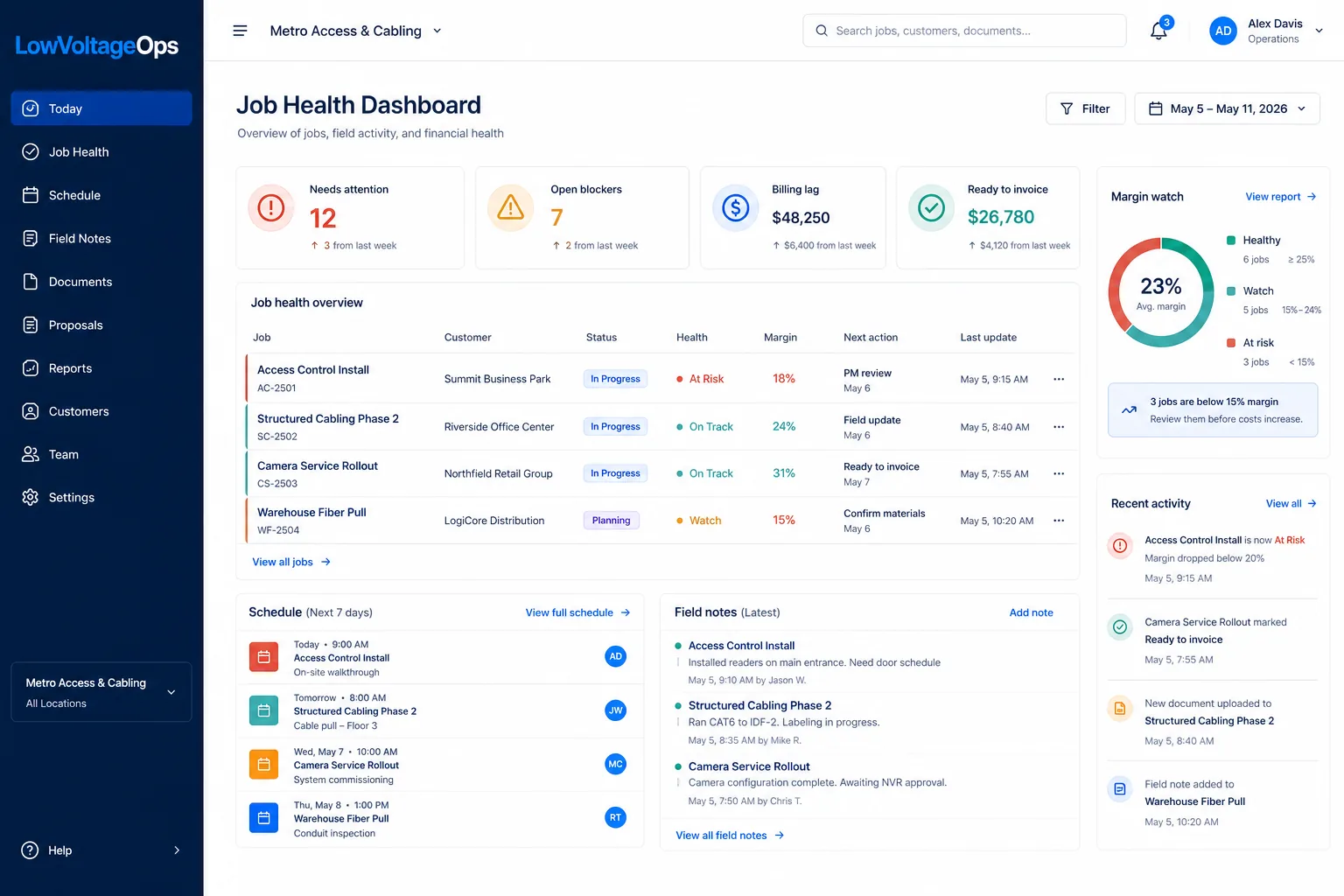
The best software for low voltage contractors is not just a project management app, a CRM, a calendar, or a field service ticketing tool. Growing low voltage teams need one operating workflow that connects proposals, job setup, scheduling, field updates, documents, change orders, closeout, billing readiness, and profitability reporting.
What low voltage contractor software should actually do
Low voltage work is different from general construction and different from simple service dispatch. A contractor may be managing structured cabling, cameras, access control, AV, network infrastructure, service calls, change orders, device documentation, closeout packages, and billing backup at the same time. That creates an operating challenge that broad software often misses.
The right software should help the company answer practical questions every week: Which jobs are on track? Which jobs are waiting on the customer, GC, material, or another trade? Which field updates are missing? Which projects are ready to bill? Which jobs are slipping margin? Which PMs need support? Which closeout documents are blocking invoice review?
If the system cannot answer those questions without a manager rebuilding the truth from spreadsheets, texts, emails, folders, and memory, it is not really operating software. It may be a useful tool, but it is not the center of the business.
The 9 workflows the best software should connect
When comparing platforms, start with workflows instead of feature labels. A feature list can look complete while the day-to-day process still falls apart between sales, PMs, field teams, accounting, and ownership.
1. Proposal and scope handoff
The job should begin with clear scope, exclusions, alternates, assumptions, estimated labor, expected materials, customer contacts, and documents. If proposal details are not connected to the job record, PMs and crews may start with incomplete information.
2. Job setup and project ownership
Every active job should have a PM, customer, site, status, next action, files, schedule expectations, and internal notes. This is where many spreadsheet systems start to strain because each person creates their own version of the job record.
3. Scheduling and crew planning
Low voltage scheduling is not just assigning a technician to a date. The team needs to know whether the site is ready, material is available, drawings are current, other trades are blocking access, and the right crew skill set is assigned. A calendar matters, but the schedule has to connect to job readiness.
4. Field notes, photos, and daily updates
Field teams need a simple way to capture what happened: completed work, blockers, site conditions, extra work, photos, punch items, material issues, and customer conversations. The office needs those updates tied to the right job, date, person, and location.
5. Change order visibility
Small undocumented changes can quietly destroy margin. Software should make it easy to flag out-of-scope work, track approval status, attach proof, and show whether the change has been billed.
6. Document control and closeout
Structured cabling, security, access control, AV, and network jobs all require documentation. The system should track drawings, as-builts, test results, photos, device lists, training notes, warranty details, punch list status, and customer handoff items.
7. Billing readiness
Completed work is not the same as ready-to-bill work. Accounting needs approved scope, billing terms, change orders, backup documents, closeout status, and exceptions. A strong system shows what can be invoiced now and what is still blocked.
8. Job profitability and margin watch
Owners need to see labor burn, billing lag, change order exposure, return trips, schedule risk, and job health before the margin damage is permanent. A monthly report is usually too late. The best software gives leadership an active view of risk.
9. Customer and site history
Low voltage contractors often return to the same sites for service, adds, moves, changes, phases, upgrades, and emergency work. Software should preserve the history of what was installed, who approved it, where documents live, and what issues have occurred before.
Low voltage contractor software comparison criteria
Use this table to compare LowVoltageOps, generic construction tools, field service tools, CRMs, spreadsheets, and accounting-first platforms. The goal is not to find the tool with the longest feature list. The goal is to find the tool that reduces the most operational friction.
| Need | What good looks like | Risk if missing |
|---|---|---|
| Job tracking | PMs can see status, next action, blockers, schedule, files, and owner from one job record. | Managers chase updates through texts, email, spreadsheets, and memory. |
| Field updates | Technicians submit notes, photos, blockers, and completed work from a simple field workflow. | PMs do not know what changed until the job is already behind. |
| Scheduling | The calendar connects to job readiness, crew assignments, and field workload. | Crews get scheduled before the site, material, or paperwork is ready. |
| Closeout | Required documents are tracked by job type before the final day. | Billing waits on photos, tests, as-builts, training notes, or punch list proof. |
| Billing readiness | Accounting can see what is ready to invoice and what backup is missing. | Finished work sits unbilled while people chase documentation. |
| Profitability | Owners see labor burn, change orders, billing lag, and margin risk. | Margin problems are discovered after the job is already over. |
| Reporting | Leadership can review job health, open blockers, ready-to-bill revenue, and PM workload weekly. | Operating meetings become status guessing instead of decision making. |
Common software categories low voltage contractors compare
There is no single category name every contractor uses. Some search for low voltage contractor software. Others search for job management software, project management software, field service software, scheduling software, construction software, CRM, or a Knowify alternative. The important thing is understanding what each category usually does well and where it may fall short.
Generic construction project management software
These tools can be strong for large construction workflows, drawing management, RFIs, submittals, and general project documentation. They can be too broad or heavy for low voltage contractors that need faster job visibility, field updates, billing readiness, and owner-level job health.
Field service software
Field service platforms can be helpful for dispatch, service tickets, reminders, technician schedules, and customer communication. The challenge is that many low voltage contractors do more than service calls. They need project work, closeout documentation, change order control, job profitability, and longer-running PM workflows.
CRM software
A CRM can help with leads, sales stages, contacts, and follow-up. But low voltage operations do not stop when the deal is won. If CRM data does not connect to scheduling, field execution, documents, billing readiness, and job margin, the team still needs another operating layer.
Accounting-first contractor software
Accounting-connected systems can be valuable for estimates, contracts, job costing, time, and invoices. Low voltage contractors should make sure the system also supports field notes, site-level documentation, closeout workflows, job health visibility, and the practical reality of mixed project and service work.
Spreadsheets and shared folders
Spreadsheets are flexible and familiar, which is why many contractors start there. They become risky when multiple people need current information at the same time. A spreadsheet can list jobs, but it usually cannot enforce field updates, show billing readiness, organize closeout proof, or give owners a reliable live operating picture.
Low-voltage-specific operating software
This is where LowVoltageOps fits. The goal is to connect the actual low voltage workflow: jobs, field updates, scheduling, proposals, documents, billing readiness, margins, and reporting in one operating system for commercial low voltage contractors.
Buyer scorecard for low voltage contractor software
Before scheduling demos, use this scorecard internally. It will make the conversations sharper and help you avoid buying software based only on the best sales presentation.
- List your top 10 recurring job problems. Include missed field updates, change order leakage, billing lag, closeout delays, schedule confusion, PM overload, missing documents, unclear job ownership, margin surprises, and customer follow-up gaps.
- Map the handoffs. Write down what happens when sales hands off to PMs, PMs schedule field teams, field teams report work, PMs prepare closeout, and accounting invoices.
- Ask each vendor to show your exact workflow. Do not settle for a generic demo. Ask how a camera job, access control job, structured cabling job, or AV project moves from proposal to billing readiness.
- Test field adoption. If technicians will not use the field workflow, the office will still be chasing notes. The mobile or field experience needs to be simple.
- Review reporting with ownership. Owners need job health, margin risk, billing lag, ready-to-bill revenue, open blockers, and PM workload. Pretty dashboards are not enough if they do not answer operational questions.
- Check closeout before buying. Ask how the tool tracks test results, photos, as-builts, punch items, training, customer acceptance, and invoice backup by job type.
- Decide what the system replaces. The best implementation should reduce spreadsheets, duplicate entry, side conversations, manual weekly reports, and disconnected folders.
Example: why a growing contractor outgrows a basic setup
A common setup looks like this: accounting and customer data in one system, project numbers in another, files in Box or Drive, field updates in a field app, schedules in a calendar, job notes in texts, and PM workbooks tracking financials. That can work for a while because good people hold the process together.
The breakdown usually appears in the middle of the job. Field updates become inconsistent. Blockers are not visible soon enough. PMs do not know which jobs have missing documentation. Closeout starts too late. Accounting waits on backup. Owners see revenue, but not the operational reasons it is stuck.
That is why the best software for low voltage contractors should act as the operating layer between field activity, PM control, billing readiness, and leadership reporting. It does not have to replace every system on day one, but it should create a single place where the company can see the truth of active work.
Where LowVoltageOps fits
LowVoltageOps is built for commercial low voltage contractors that need more than a generic app. It connects low voltage job management software, scheduling, field service updates, reporting, closeout documentation, billing readiness, and profitability visibility in one workflow.
It is especially relevant for teams that are running commercial cabling, security, access control, AV, networking, or mixed project and service operations where spreadsheets, generic tools, or accounting-first systems are no longer enough to show job health.
Frequently asked questions
What software do low voltage contractors use?
Low voltage contractors often use a mix of accounting software, spreadsheets, CRMs, field service tools, project management systems, shared folders, and text messages. Growing companies usually need a more connected workflow that brings job tracking, scheduling, field notes, closeout, billing readiness, and reporting together.
Is low voltage contractor software different from construction software?
Yes. Low voltage contractors share some needs with construction companies, but they also need workflows for devices, cabling, cameras, access control, AV, field photos, service history, closeout documents, test results, and recurring customer sites. Generic construction software may support part of this, but it often misses the operating details.
What is the best Knowify alternative for low voltage contractors?
The best Knowify alternative depends on whether the contractor needs accounting-heavy workflows, project management, field service, or a low-voltage-specific operating system. Contractors comparing options should read our Knowify alternative guide for low voltage contractors.
How does software reduce billing lag?
Software reduces billing lag by connecting completed work to the proof accounting needs: approved scope, change orders, field notes, photos, test results, closeout documents, punch list status, customer acceptance, and invoice backup. See the detailed guide on reducing billing lag in low voltage projects.